GST billing & accounts · for Windows

Make the GST bill. Keep the books. On your own PC.

LedgerDesk is accounting and invoicing software for Indian shops, traders and small manufacturers. Make tax invoices, record purchases and payments, keep track of stock and get your GST figures ready, with or without the internet.

v1.5.0Windows, 64-bit14-day free trial

Shop in Uttar Pradesh · customer in
Taxable value
₹1,00,000.00
CGST 9%
₹9,000.00
SGST 9%
₹9,000.00
Total
₹1,18,000.00

An example. LedgerDesk splits GST the same way, from your state code and the customer's.

  • 14 days

    Free trial. It starts the first time you open the app.

  • 9% + 9%

    Or 18% IGST. Chosen for you on every bill from the customer's state.

  • 7 backups

    A copy of your books is made each day you open the app; the newest seven are kept.

  • F8

    Opens a new sales bill from anywhere. Keyboard first, Tally-style.

Everything a small business books in a day.

Bills, purchases, money in and out, stock and GST, all in one place on your PC.

No tag: in the download today (v1.5.0)Next updatebuilt, coming in the next version

01

Sales & GST invoices

The bill is the heart of it. Fill it in once and the GST, stock and party balance follow.

  • The right GST, by itself

    CGST + SGST inside your state, IGST outside it, worked out from state codes. Tax per rate, freight with its own GST rate, and round-off.

  • A proper A4 tax invoice

    Your logo, GSTIN, bank details and terms. Billed-to and shipped-to, HSN on every line, amount in words in lakh and crore.

  • Numbering by financial year

    Numbers like INV/26-27/001, with your own prefixes, padding and separator.

  • Edit or cancel, with a trail

    Cancel keeps the record, reverses stock and balances, and marks the PDF CANCELLED instead of deleting it.

  • Credit notes

    Sales returns against the original bill, item by item, with GST reversed and stock put back.

  • Debit notes Next update

    Purchase returns against the supplier's bill, with their own PDF.

02

Purchases, payments & receipts

Know who owes you and whom you owe, to the paisa.

  • Purchase bills

    With the supplier's own invoice number, GST input split the same way, freight and round-off.

  • Money in and out

    Payments and receipts by cash, bank transfer, cheque, UPI or card. Record a part-payment right on the bill.

  • Party ledgers

    A statement for every customer and supplier with opening balance, running balance and outstanding.

  • Scan a supplier's bill Next update

    Pick a photo or PDF. AI reads the supplier, items and totals into a purchase that you check before saving. Use your own key for Gemini, Groq, Mistral, OpenRouter and others, or Ollama on your own PC.

  • Keep the original bill Next update

    Attach the supplier's PDF or photo to the purchase and open it later from the register.

  • Journal and contra Next update

    Cash to bank, bank to cash, and any balanced journal entry.

03

Stock & manufacturing

Stock moves with every bill, so the count on screen is the count on the shelf.

  • Item master

    HSN/SAC, unit, GST rate, cost, listing and selling price, quantity in hand and stock value.

  • Production

    Use up raw materials and add finished goods to stock, with labour and power added to cost.

  • Bills of materials

    Save a recipe once and fill each production run from it, scaled to the quantity.

  • Re-order list and stock count Next update

    A re-order level per item, a list of what to buy, and a physical count that books the difference.

04

GST returns & e-way bills

Your figures, ready for the portal.

  • GST Summary

    Output tax, input tax and net payable for any period, split into CGST, SGST and IGST.

  • HSN Summary Next update

    Outward supplies per HSN with quantity, taxable value and tax, returns netted off.

  • GSTR-1 Next update

    A section-by-section preview (B2B, B2CL, B2CS, CDNR, HSN and more), a check for what the portal would reject, and JSON for the GST offline tool or an Excel copy.

  • GSTR-3B Next update

    Review 3.1, 3.2, ITC and 6.1, with tax payable in cash after set-off. JSON or Excel.

  • E-way bill JSON Next update

    Flagged on bills of ₹50,000 or more, with a readiness check, and written for bulk upload on the e-way bill portal.

  • LedgerDesk prepares the figures and files. You or your accountant still upload them and file on the government portals; it does not file for you.
05

Reports, printing & sharing

The numbers your accountant asks for, and the bill your customer asks for.

  • Reports

    Dashboard, Trial Balance, Day Book, Stock Summary, GST Summary and Outstanding.

  • Profit & Loss, Balance Sheet Next update

    For any period, with click-through to the ledger behind a line.

  • Send the bill on WhatsApp

    View the real PDF inside the app, then share it to WhatsApp or e-mail, or print it.

  • Export

    The voucher register and party statements to CSV or PDF. Excel too Next update

  • Import from Excel Next update

    Bring in items, parties and opening balances from Excel or CSV, with a dry run before anything is written.

Plain screens. Numbers first.

Big figures, clear tables, and a shortcut for everything you do every day.

LedgerDesk dashboard with cards for cash, bank, receivables, payables, sales this month and stock value, and a list of recent vouchers. Demo data.

Real screens from the current build of LedgerDesk, filled with made-up demo businesses. A few tools you can see here, such as bill scan, debit notes, journal and GST returns, arrive with the next update.

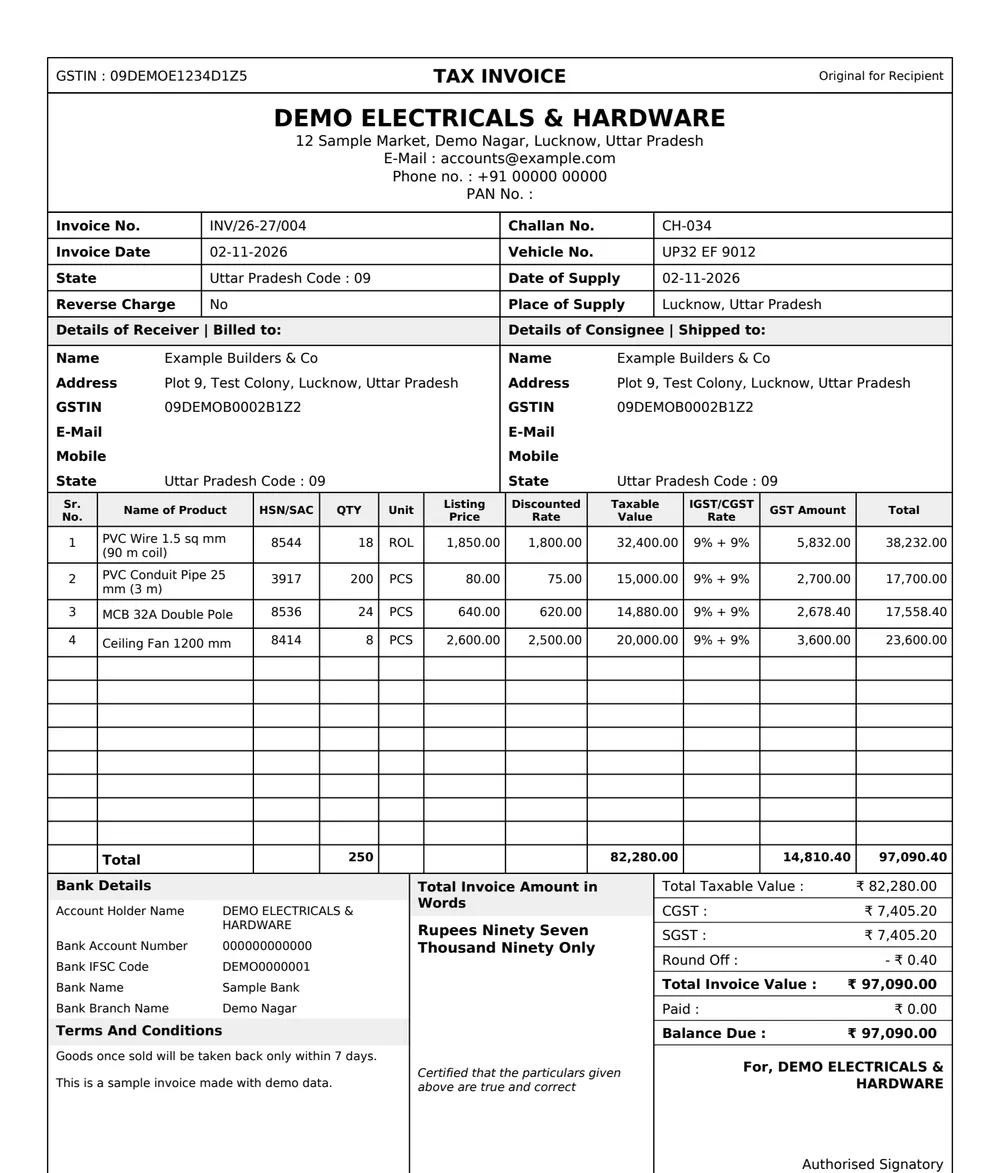
An A4 tax invoice made by LedgerDesk for a demo business: GSTIN strip, company block, invoice number INV/26-27/004, billed-to and shipped-to, four item lines with HSN and CGST 9% plus SGST 9%, bank details, amount in words and a total of ₹97,090.00.

The bill your customer gets.

This is the actual PDF LedgerDesk makes, for a demo business. It is the same file you print or send on WhatsApp.

  1. GSTIN on top, "Original for Recipient"

    The layout Indian businesses expect.

  2. Billed to and shipped to

    Separate addresses when goods go somewhere else.

  3. HSN, unit and rate on every line

    Listing price and your discounted rate, side by side.

  4. CGST + SGST, or IGST

    Picked from the state codes, never typed by hand.

  5. Amount in words, round-off, balance due

    "Rupees Ninety Seven Thousand Ninety Only."

Your books stay on your PC.

No login to make a bill, and no waiting on a slow connection. The books are a file on your computer that you own.

Offline

Works with the internet off

Billing, stock, payments and reports all work without the internet. The app goes online only to look for updates, to check your licence once you have one, and, if you sign in or turn on cloud backup, to reach LedgerDesk's server. A licence keeps working for 14 days without a connection.

Daily

Backups you don't have to remember

Each day you open LedgerDesk it saves a copy of the books and keeps the newest seven. Use Backup Now any time to put a copy on a pen drive. Updates install in the app and keep your data.

Cloud In testing

Cloud backup, one press

Turn it on and the app keeps an up-to-date copy of your books on LedgerDesk's server in India, with up to 30 days of history. Your PC stays the only place the books are changed, and it still works fully offline.

Android · in development

LedgerDesk on your phone, coming.

We are building an Android app. It is not ready yet, and we would rather tell you plainly what it will do and in what order.

Get notified on WhatsApp
  1. Today

    Windows app

    Everything on this page without a tag. The phone app is not available yet.

  2. First

    Your real books on the phone, to look at

    Sales, purchases, parties, stock and reports from your PC's books, and bills as PDFs you can share. Planned to read only.

  3. Later

    Bills, payments and receipts from the phone

    Planned, step by step: money in and out first, then sales bills, purchases with bill scan, stock, returns and e-way bills, each showing up on the PC.

  4. Not planned

    iPhone

    Not planned yet. Tell us on WhatsApp if you need it.

Try it free for 14 days.

No card to try, and signing in is optional. If you like it, you buy a licence for your PC.

Free trial 14 days
  • Every feature in the download, no limits.
  • The trial starts the first time you open the app.
  • If it ends before you buy, the books turn read-only. You can still open, view, print and export everything; nothing is deleted.
Download for Windows
Licence Contact us
  • Ask us for pricing on WhatsApp.
  • You get a licence key to enter in the app.
  • A licence is for one PC. To move it to another PC, send us the Machine ID shown in Settings.
Contact us for pricing

Questions, answered.

Does it need the internet?

No, not to work. Bills, stock, payments and reports all work offline. The app goes online only to look for updates, to check a licence key once you have entered one, and, if you sign in with Google or turn on cloud backup, to reach LedgerDesk's server. A licence keeps working for 14 days without a connection.

Where is my data kept?

On your PC, in your Windows user folder (%APPDATA%\LedgerDesk). Updating or reinstalling the app does not touch it. A backup is made each day you open the app, and you can copy the books to a pen drive with Backup Now. Cloud backup, now in testing, is off unless you turn it on.

Does LedgerDesk file my GST returns?

No. It works out the figures and, from the next update, writes GSTR-1 and GSTR-3B files for the GST offline tool and e-way bill files for the e-way bill portal. You or your accountant upload and file them on the portals.

Windows says "Windows protected your PC". Is it safe?

That message, called SmartScreen, appears because the installer is not yet signed with a paid code-signing certificate. Click More info, then Run anyway. Download only from this website or the link on it. See the steps.

Is there a Mac or phone version?

Not yet. LedgerDesk is for Windows today. An Android app is in development; see what is planned. There is no Mac or iPhone version.

What happens when the trial ends?

If you have not entered a licence key, the books become read-only. You can still open them, view, print and export. Nothing is deleted. Enter a key and you can carry on where you left off.